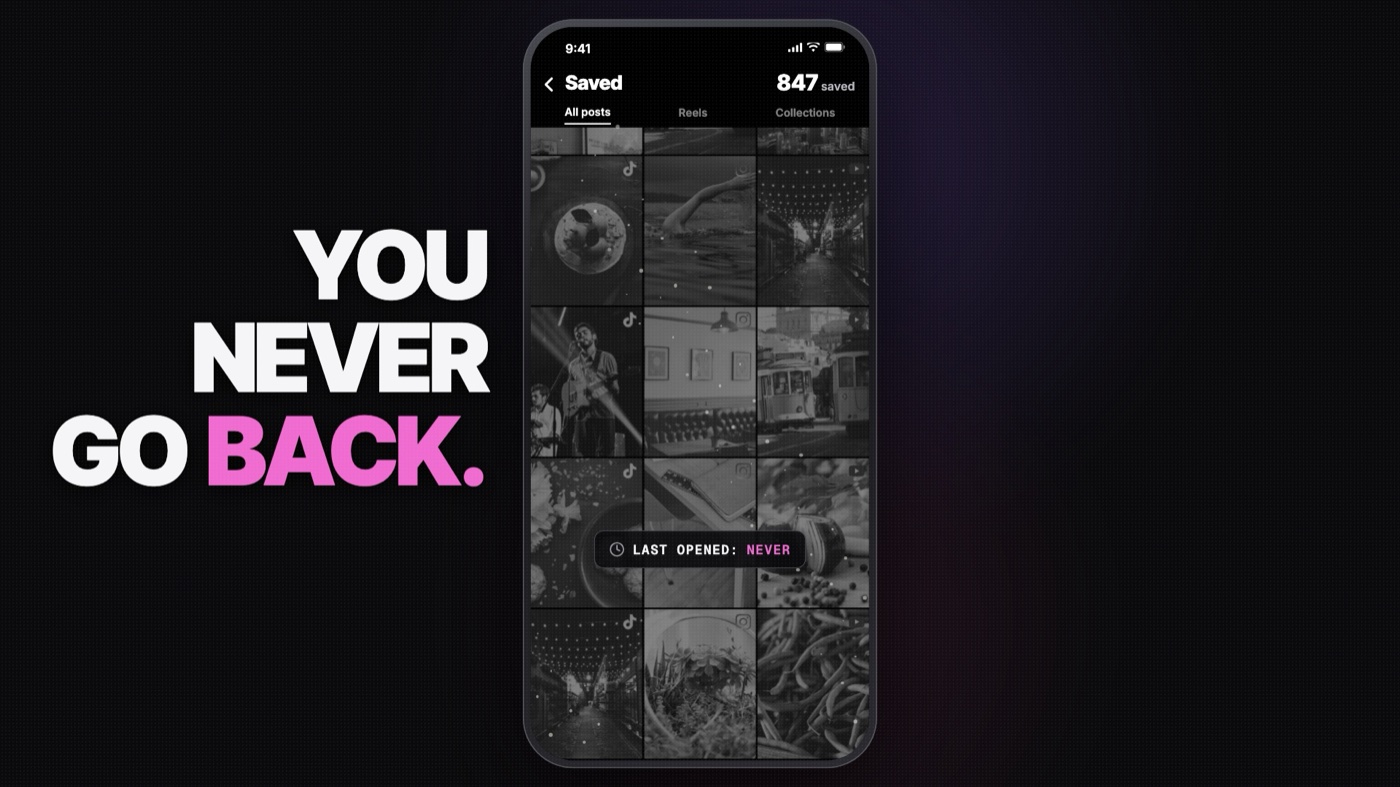
We all do it. You're scrolling, you see a reel that's actually useful. A pasta recipe, a 10-minute workout, a café in Tokyo you swear you'll visit. You tap save.
And you never open it again.
My Instagram saved folder had hundreds of these. TikTok had more. YouTube had a "Watch later" playlist that was really a "Watch never" playlist. All that know-how, sitting in three different apps, completely useless.
So I built Snipo. You share a reel to it, it reads the reel for you, files it, and lets you ask your whole library anything. "What do I need for that garlic pasta?" "Plan me a weekend in Lisbon from my saves." Then it turns the answer into a checklist you can actually tick off.
It's live on the App Store today, and this is how I built it: the architecture, the decisions, and the things that broke along the way.
The Big Decision: No Server
Snipo didn't start local-first. The first version, shipped in February, ran on Supabase. It had Google sign-in, ads and social features. It worked, but it felt wrong.
Think about what's in someone's saved reels. Recipes, sure. But also workouts, health tips, travel plans, things they want to buy. That's a pretty personal picture of someone's life. I didn't want it sitting on my server, and honestly, I didn't want to be paying to host it either.
So in October I tore it out. One commit touched 524 files: +41.6k lines, −43.2k lines. No Supabase. No accounts. No ads. No analytics.
The rule became simple:
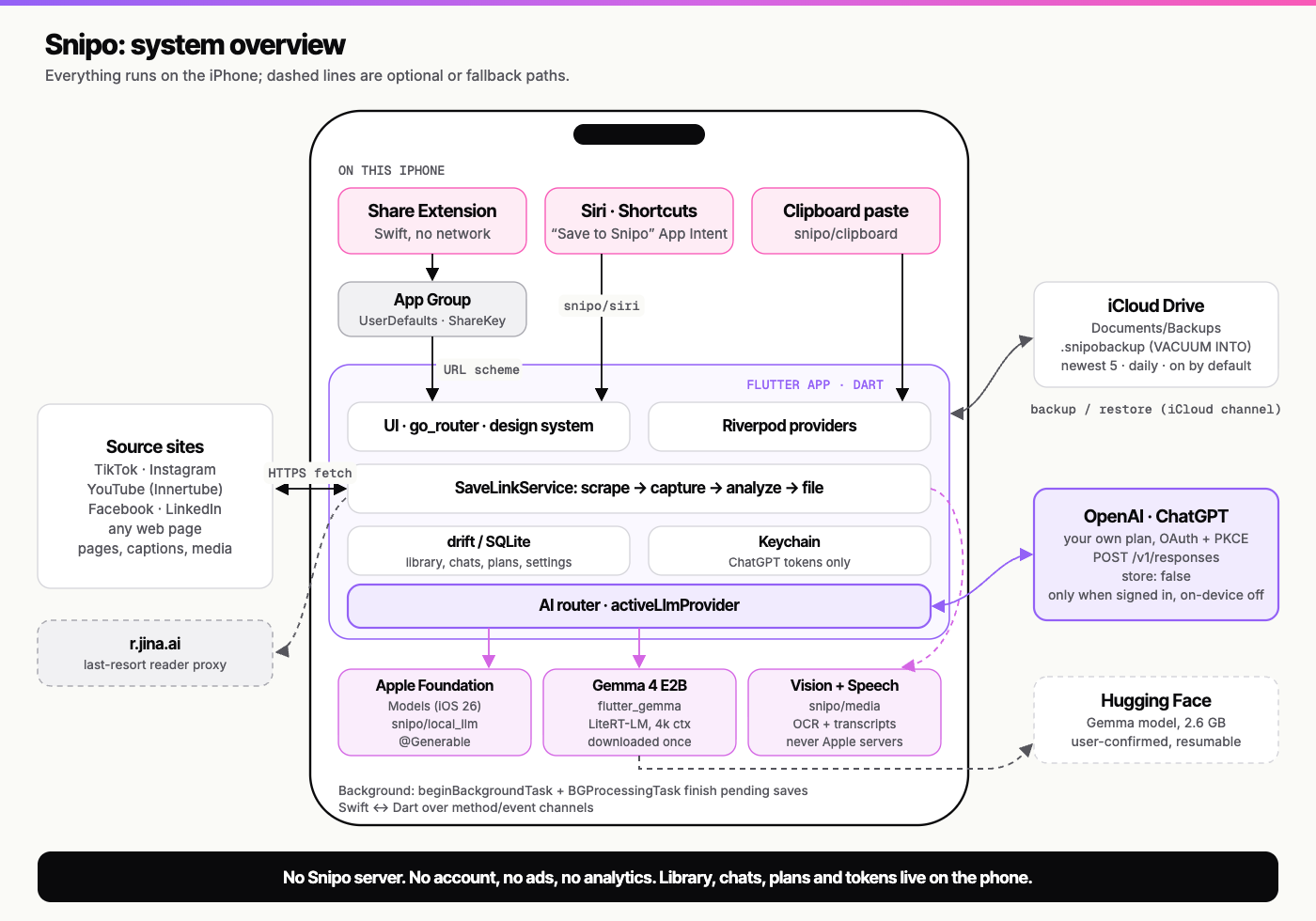
- Everything lives on the phone. Library, chats, plans, settings.
- No Snipo server, ever. There is literally nothing for me to leak.
- AI either runs on the iPhone, or on the user's own ChatGPT plan. Not mine.
That one decision shaped everything else.
The Stack
Nothing exotic here. I've been using Flutter since 2018 (I wrote a "first impressions" post back then), and it's matured into a genuinely great way to ship mobile apps.
- Flutter 3.41 with Riverpod for state and go_router for navigation
- drift / SQLite as the on-device database
- Swift for everything iOS-specific: the Share Extension, Siri intents, Vision OCR, on-device speech, and Apple's Foundation Models, all talking to Dart over method channels
- iCloud Drive for backups: a SQLite snapshot, daily, newest five kept, never including tokens
Today the app is about 59,000 lines of Dart and 1,350 lines of Swift, with 679 tests.
Saving a Reel: Harder Than It Looks
The core flow sounds trivial. User taps Share, picks Snipo, done. In practice, this is where most of the engineering went.
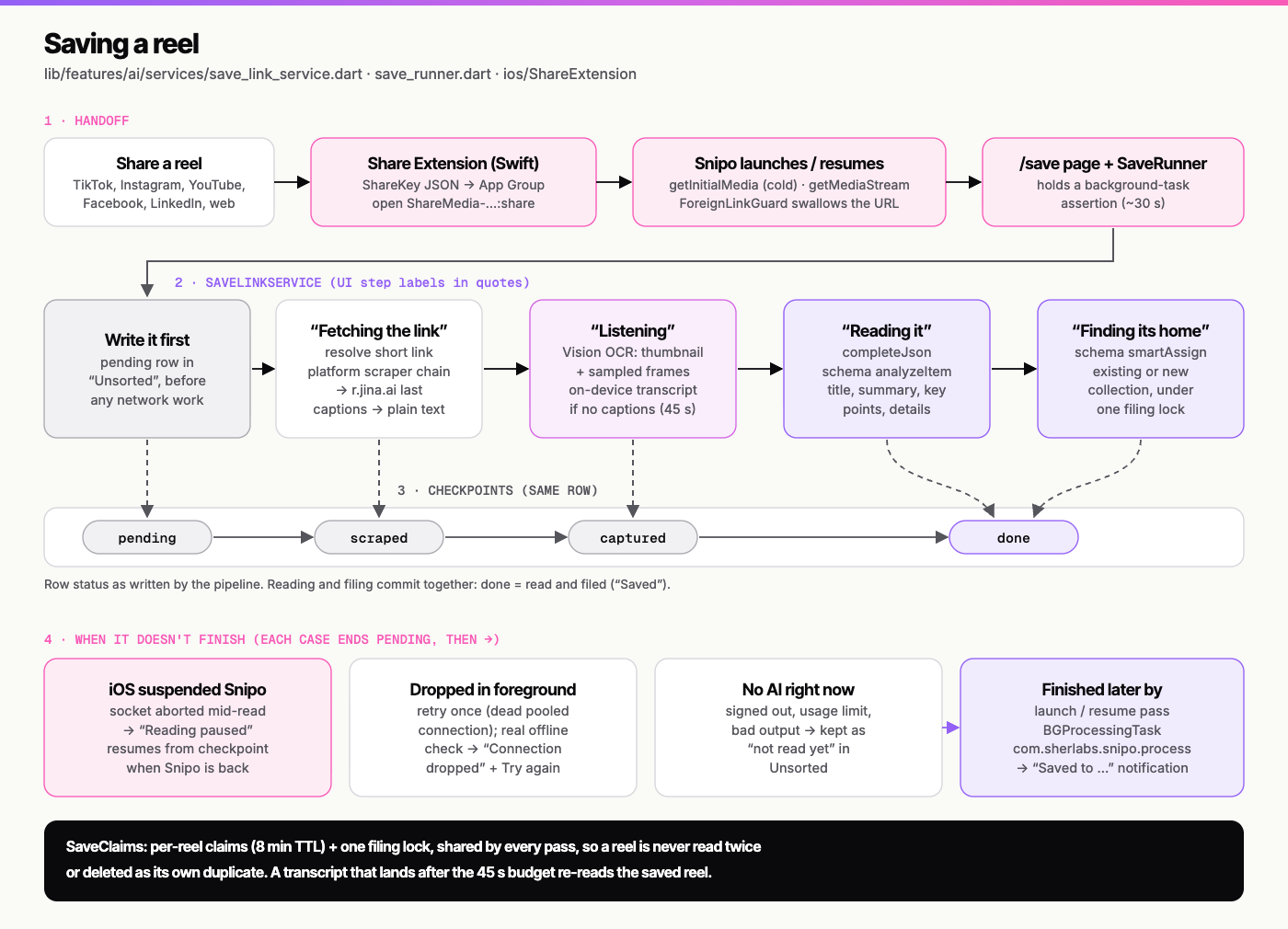
1. The Share Extension does almost nothing. iOS share extensions are memory-limited and get killed easily. So mine doesn't touch the network. It writes the link into a shared App Group and opens the main app through a URL scheme. That's it.
2. Save first, then work. The link goes into the database before any network call. Then every step is checkpointed: pending → scraped → captured → done. If iOS suspends the app halfway through (and it will), the save resumes where it stopped instead of starting again.
3. Scraping without API keys. There's no official "give me this reel's content" API for any of these platforms. So each platform gets its own scraper. TikTok needs an iPhone user agent to get past its firewall. YouTube goes through its internal mobile clients. Instagram, Facebook and LinkedIn each have their own quirks. Captions, OCR on frames (Vision) and transcripts (on-device speech) all run on the phone.
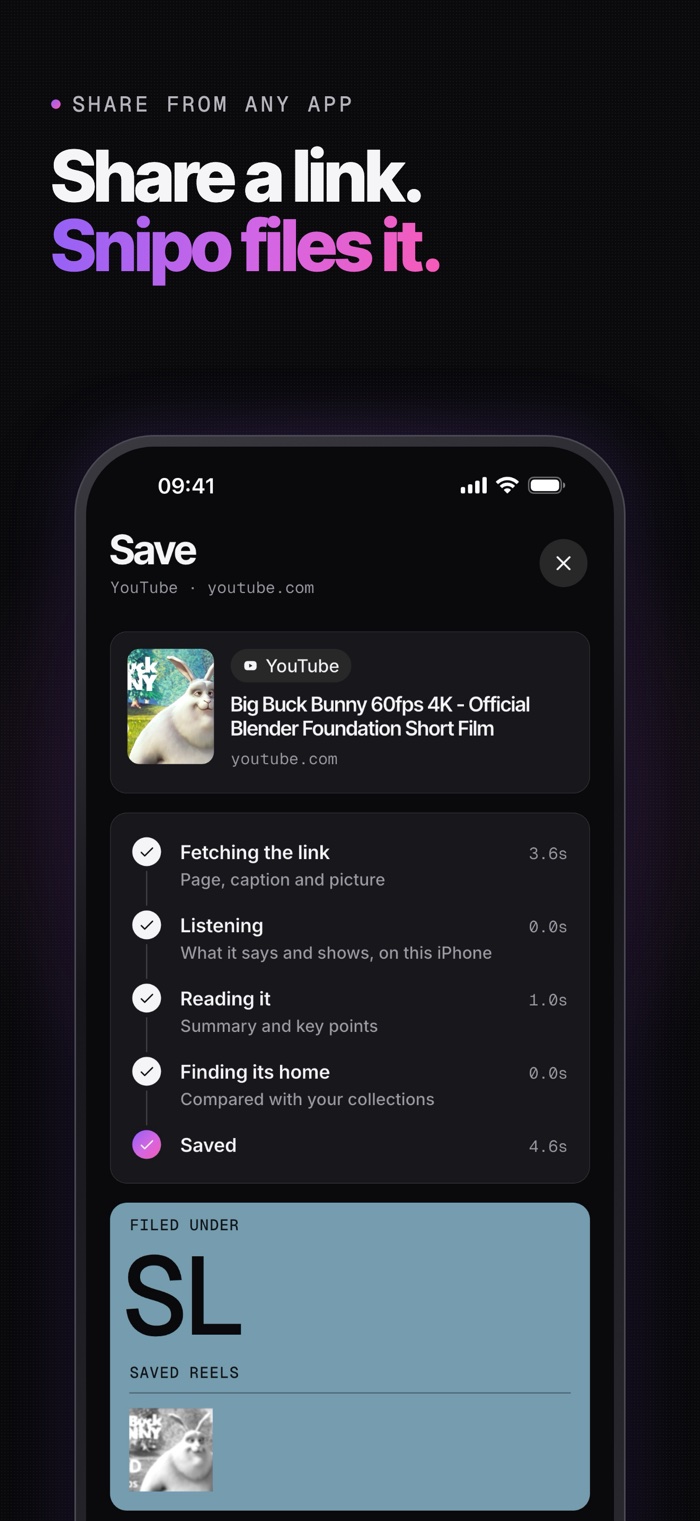
4. Read it, then file it. The AI writes a short summary, pulls out the steps, places, products or recipes, and picks the right collection. The user sees it happen live: Fetching the link → Listening → Reading it → Finding its home.
Bring Your Own AI
Here's the problem with "no server" and "AI app" in the same sentence: someone has to pay for the AI.
My answer was Sign in with ChatGPT. Users connect the ChatGPT Plus or Pro plan they already pay for. It's OAuth with PKCE through a loopback server on the phone. Tokens live in the iOS Keychain, and requests go straight from the phone to OpenAI with store: false. I never see any of it.
That worked, but it left out everyone without ChatGPT. So version 2.0.2 (rolling out now) adds on-device AI:
- Apple Foundation Models on iPhones with Apple Intelligence (iOS 26+). The best part is guided generation: instead of asking the model for JSON and praying, I define typed Swift structs with
@Generable, and the model fills them in directly. Six structured outputs (item analysis, collection assignment, three kinds of summaries, cover design) all go through this. No more broken JSON. - Gemma 4 E2B for iPhones with 6 GB of RAM that don't have Apple Intelligence. It's a 2.6 GB download, only after the user confirms, resumable, and deletable from Settings.
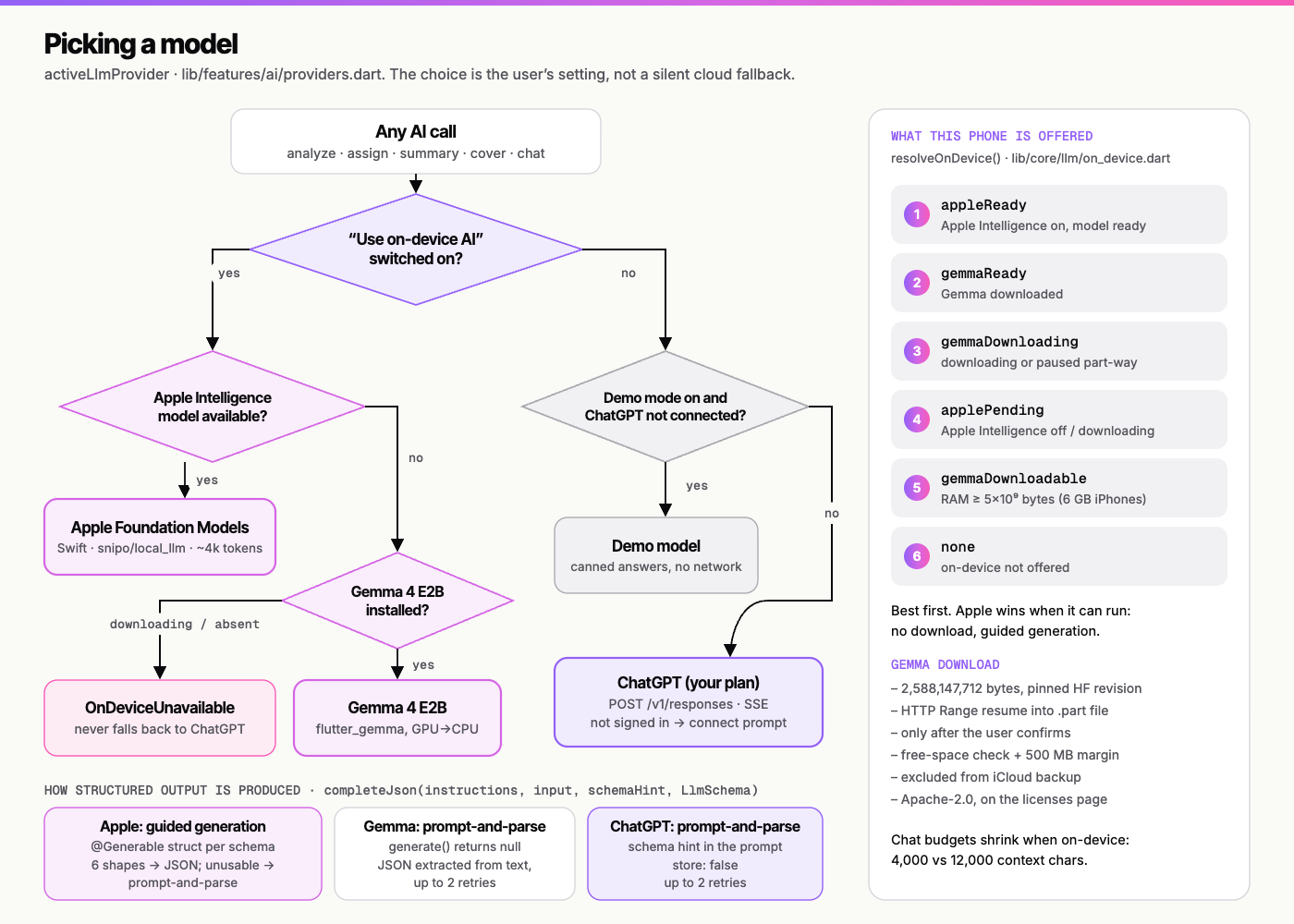
One rule I was strict about: if the user chose on-device AI and it isn't available, Snipo shows an error. It never quietly falls back to sending their content to ChatGPT. If you say "keep it on my phone," it stays on your phone.
Ask: RAG Without Embeddings
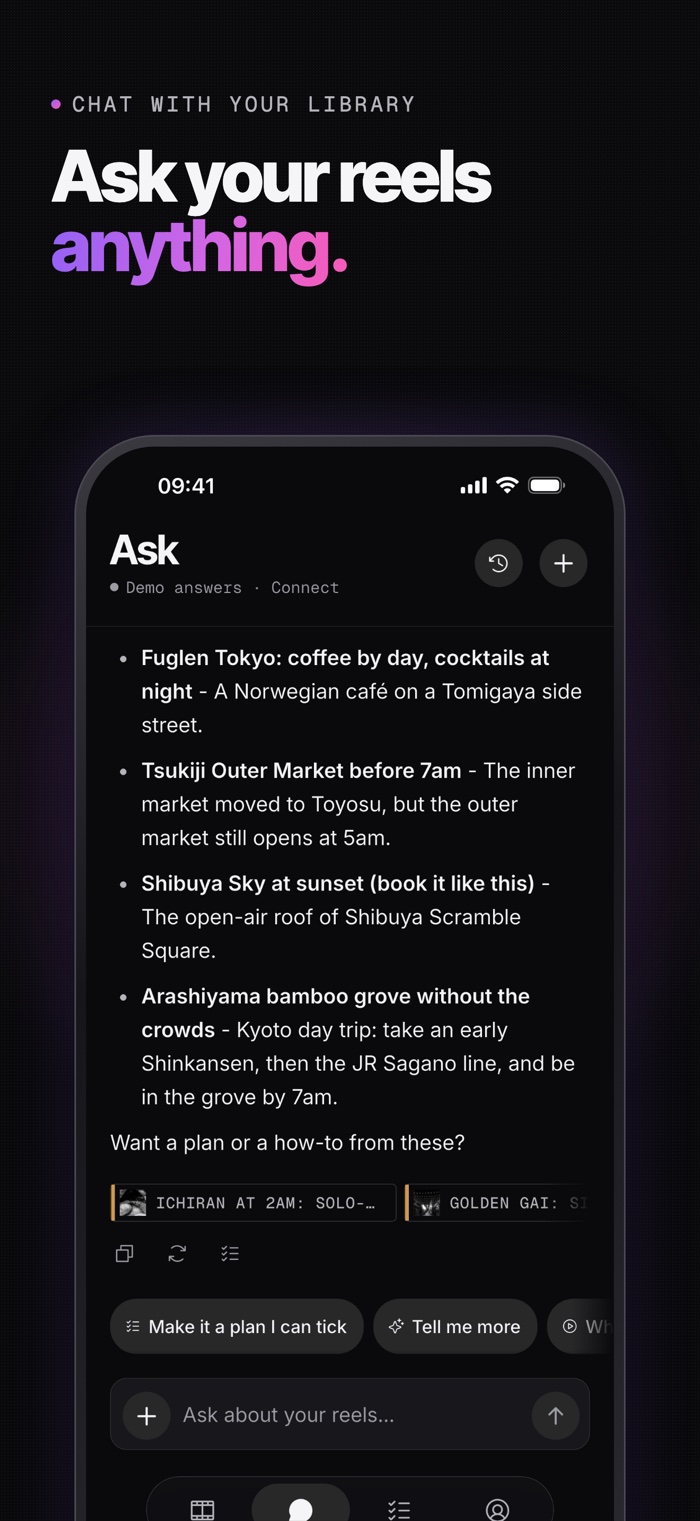
My favourite feature is Ask. You type a question, and Snipo answers from your own reels, with source chips you can tap.
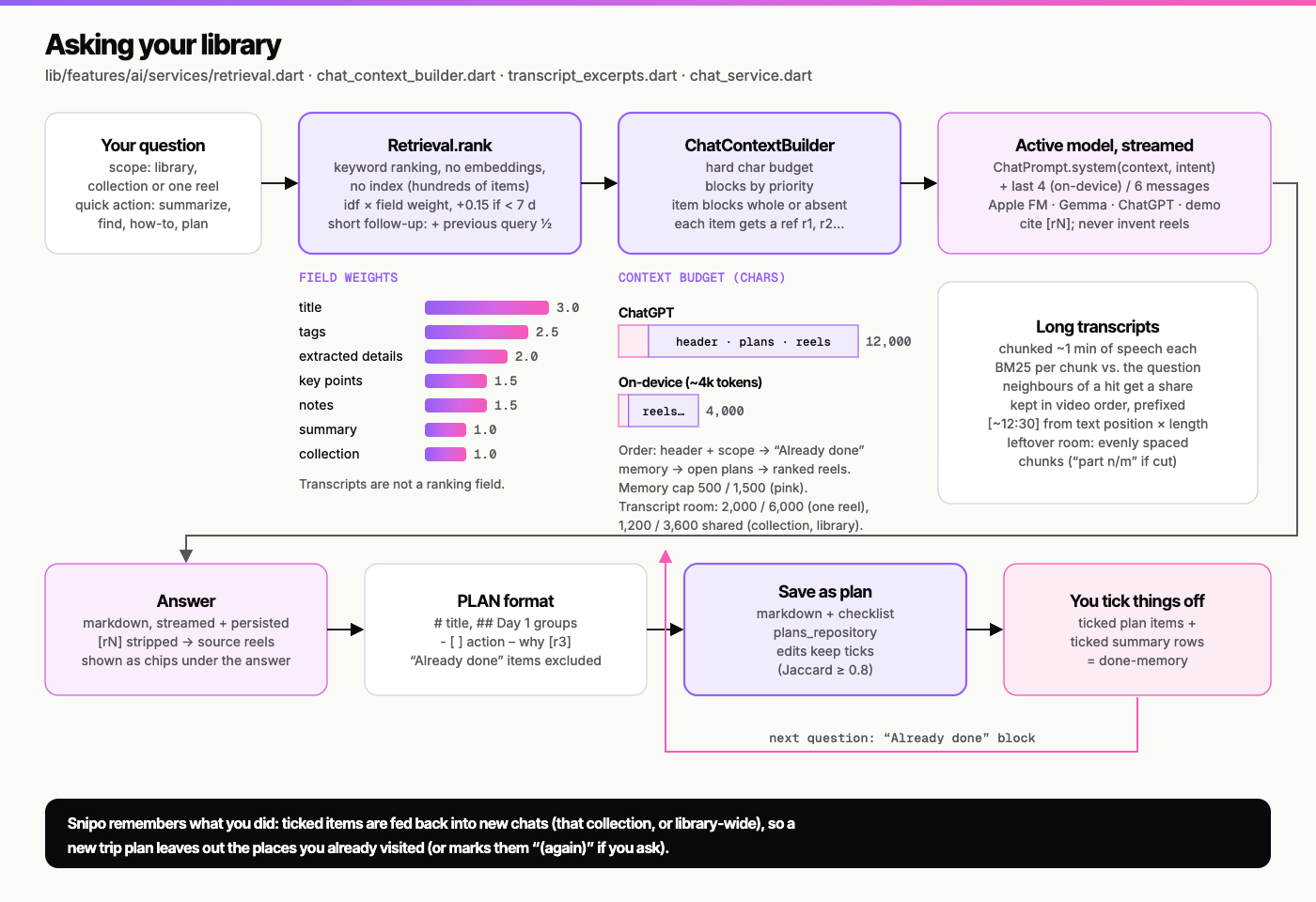
I didn't use embeddings. For a personal library of a few hundred reels, a good keyword ranker with field weights does the job and costs nothing. Long YouTube transcripts get split into BM25 chunks with approximate timestamps, so an answer can point to roughly where in the video something was said.
The interesting constraint is context size. ChatGPT gets about 12,000 characters of library context. Apple's on-device model gets about 4,000. So retrieval has to be sharp: the best few reels, the best few chunks, nothing wasted.
Plans That Remember
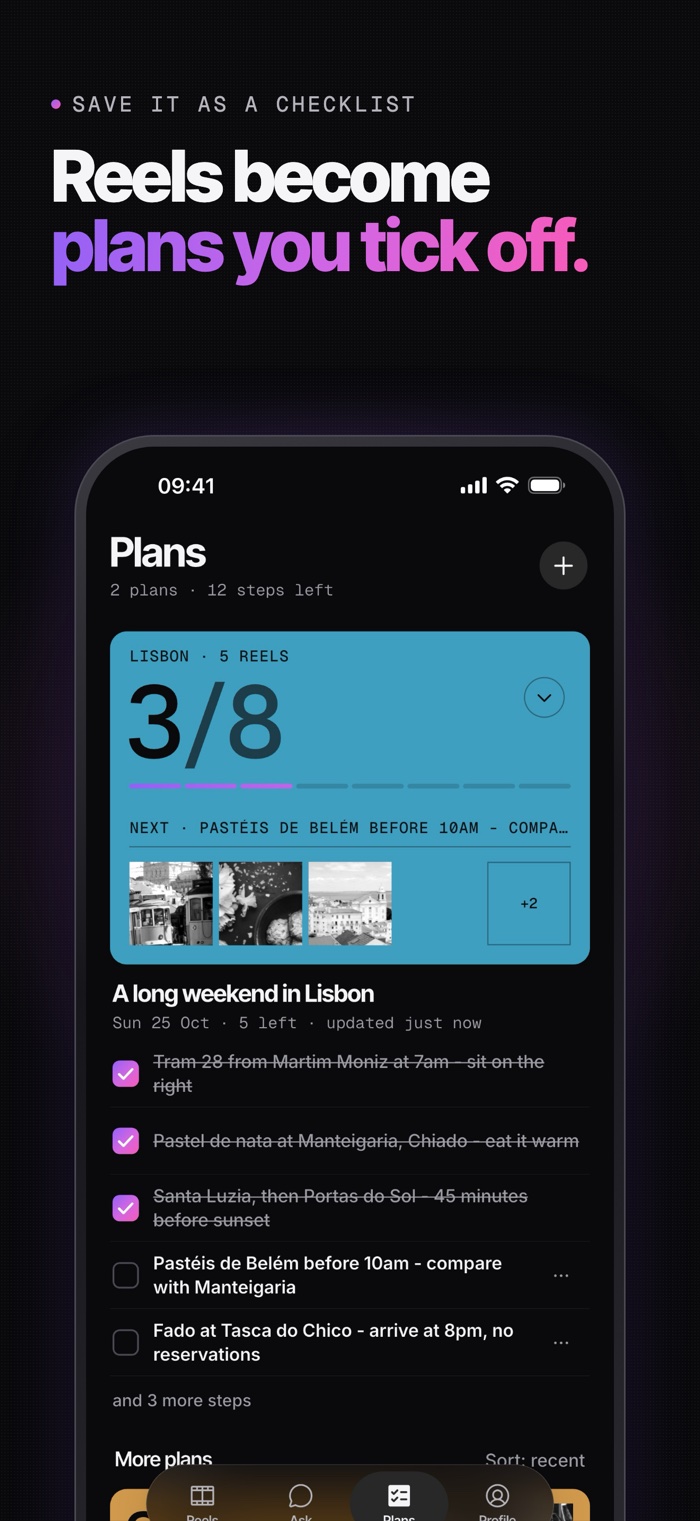
An answer is nice. A checklist is useful.
Any answer can be saved as a plan. Tick things off as you go. And here's the small detail that makes it feel smart: everything you've ticked is fed back into the next conversation as "already done." Ask for a new weekend plan and it skips the café you already went to.
Things That Broke
No build story is honest without these.
- Cold-start shares showed "Page Not Found". Sharing to Snipo while it wasn't running made Flutter treat the share URL as a deep link to a route that didn't exist. Fix: turn off Flutter's deep linking and add a guard that swallows the share URL.
- A launch crash on iOS 27. Fixed by moving to the scene-based app lifecycle.
- Retries deleting reels. Two retry passes running at once decided a reel was its own duplicate and deleted it. Fix: per-reel claims with a timeout, which I later raised from 3 to 8 minutes.
- "Paused" isn't "dropped". When iOS suspends the app, it kills the network connection, not the link. I had to split "Reading paused" from "Connection dropped" so users weren't told something failed when it was just waiting.
- Six visual redesigns in three days. Then a proper readability pass: 4.5:1 contrast everywhere and Dynamic Type tests, because a pretty app nobody can read is useless.
Building With AI as a Teammate
I wrote last year about the rise of the Product Engineer: someone who doesn't just write code, but owns the product, the UX and the decisions. Snipo is me trying to live that.
I built it with Claude Code as a pair programmer. Of 216 commits, 95 have Claude as co-author. It wrote a lot of code, but the more interesting part is what it freed me up to do: obsess over the share flow, redo the design six times, and make the calls about privacy that actually define the product.
AI didn't replace the engineering. It changed which parts of it I spend my time on.
What's Next
- Android is coming soon.
- More on-device smarts as Apple's models get bigger context windows.
- And as always, fewer taps between "I saw something useful" and "I actually did it."
If you've got a saved folder full of reels you'll never open again, give it a try:
Download Snipo on the App Store
Snipo is free, has no ads and no account, and it's built by one person. If it's useful to you, you can support it here. And I'd genuinely love to hear what you save first.